

Soft kicks used to be the bane of every mix I sent out. I’d EQ and compress until the drums sat right in headphones, then play the track on a phone speaker and watch them disappear completely. I’d been leaning on XLN Audio DS-10 Drum Shaper to fix that, and it works, but it’s a paid plugin with a learning curve that took me a weekend to get comfortable with.
Cymatics Diablo Lite 1.0.3 solves the same problem with two knobs. It’s a free drum and 808 enhancer built around a punch stage and a clip stage, and it’s meant to make weak-sounding drums cut through a mix without a full remix session. I also keep Cymatics Voxity in my template for vocal chains, so pairing another free tool from the same developer into my drum bus felt like a natural fit.
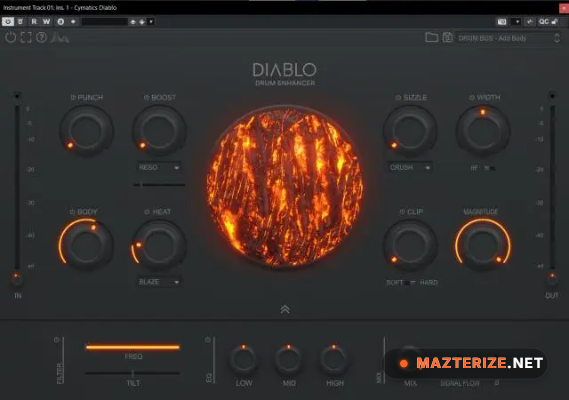
The design is deliberately simple. On the left side you get Punch, a transient shaper that acts like a parallel compressor, pushing the attack of a kick or snare forward without touching the overall level. On the right side is Clip, a hard and soft clipper that adds saturation and harmonic content. Run a sample through both and the perceived loudness jumps noticeably, even when the raw decibel level hasn’t actually changed.
What makes it worth installing over other free enhancers is how it’s tuned specifically for trap and hip hop style drums and 808s. I tested it on a handful of soft kick samples pulled from an older sample pack, and the difference after running them through Diablo Lite was obvious within seconds. No EQ moves, no extra compressor in the chain, just two knobs doing exactly what they’re supposed to do.
It’s also worth noting this is a “lite” release. Cymatics has said a full paid version is planned, with extra parameters like body and heat controls, a built-in filter section, and a 3-band EQ. For now, the free version covers the two most useful stages on its own, which is honestly enough for most mixing situations.
Key Features
- Punch stage: transient shaper for accentuating kick and snare attack
- Clip stage: modern hard and soft clipper for added saturation
- Built specifically for enhancing drums and 808s
- Two-knob interface designed for fast, intuitive use
- VST, VST3, and AU plugin formats supported
- Compatible with major DAWs including FL Studio, Ableton Live, Logic Pro, and Pro Tools
ScreenShots

System Requirements
- Windows 10 or later (64-bit)
- macOS 10.13 or later (64-bit)
- A DAW supporting VST, VST3, or AU plugin formats
- 4 GB RAM minimum
- 50 MB free disk space for installation
Why I Recommend
It’s rare that a free plugin earns a permanent spot on my drum bus, but Diablo Lite has stayed there since I first tried it. The Punch knob alone fixed a problem I’d been patching with 3 or 4 separate plugins before, a compressor for the transient, an EQ for presence, and a limiter to catch the peaks.
The Clip stage is what actually surprised me. It’s tuned well enough that pushing it hard doesn’t turn drums harsh or brittle the way a lot of free clippers do. There’s a ceiling to how far you’d want to push it, sure, but the range before that point is genuinely usable on a finished mix, not just a demo.
If you’re building out a drum processing chain, I’d pair it with something from our Audio Software section for the saturation or EQ side of things, since Diablo Lite is deliberately narrow in scope. It does the punch and clip job and nothing else, which is exactly why it’s easy to slot into any existing setup.
You May Also Like
Technical Details
- Developer: Cymatics
- Version: 1.0.3
- Platforms: Windows
- Formats: VST, VST3, AU
- License: Full
Download Information
Download | Size: 16.62 MB | Pass: Mazterize.net


