Voicemod Meme Soundboard 0.12.1 for Android
 Dropping a perfectly-timed sound effect into a Discord call or a group chat voice note used to mean fumbling through a folder of saved audio clips. Voicemod’s PC soundboard already covers that for desktop streaming, and this Android app is the mobile companion built to trigger those same sounds and manage soundboards straight from your phone.
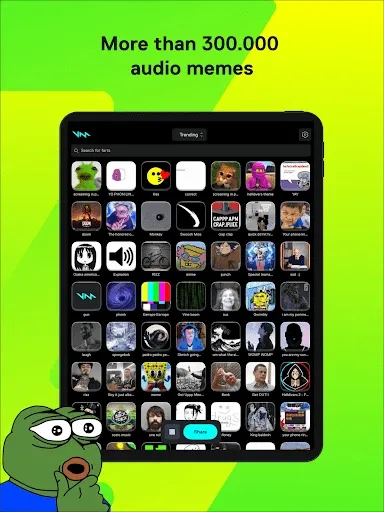
The app pulls from Voicemod’s larger community sound library, giving access to hundreds of instant sounds sourced from the same community behind Voicemod’s popular desktop voice changer and soundboard software. You can organize favorite sounds into custom presets, browse curated themed collections, seasonal drops, meme compilations, and trigger any of them with a tap during a live call or while recording.
What makes the mobile app genuinely useful beyond standalone meme-dropping is the connection back to the desktop client. Logging into the same Voicemod account links your phone to the PC version, letting you trigger sounds remotely during a stream while the actual audio plays through your desktop setup. That turns the phone into a wireless soundboard controller, useful for streamers who don’t want to reach for a keyboard shortcut mid-game.
Key Features
- Large library of meme sounds, celebrity voices, and sound effects
- Integration with WhatsApp, Discord, Skype, and other messaging apps
- Custom soundboards for organizing favorite sound clips
- Curated themed collections: seasonal and meme-specific sound packs
- Remote control link to the Voicemod desktop client via account login
- Save and share sound creations on social media
- Simple browse-and-tap interface, no audio editing experience needed
- Regular content updates with new sounds and filters
ScreenShot

System Requirements for Android
- Operating System: Android 9.0 (Pie) or later (Optimized for Android 16.0).
- Processor: 1.4 GHz Quad-core or faster.
- RAM: 2 GB Minimum (4 GB recommended).
- Hard Disk Space: 50 MB for core installation.
- Functionality: Real-time voice changing requires the Voicemod Desktop application.
Why I Recommend
The desktop link is what actually justifies installing a second app rather than just using a generic sound clip app. Being able to trigger a soundboard clip from your phone while streaming on PC, without alt-tabbing or reaching for a hotkey mid-match, is a genuinely practical workflow for anyone streaming games or running a podcast setup.
Where it’s a weaker fit is for anyone who just wants a couple of sound effects occasionally. The app leans on an account login and a broader ecosystem tied to Voicemod’s desktop software, which is overhead you don’t need if you’re only after a handful of clips for the occasional group chat. A simpler standalone sound clip app would be less setup for that narrower use case.
If audio and content creation tools are your thing, our Audio Software section has more tools worth pairing with a mobile soundboard like this one.
Technical Details
- Software Name: Voicemod Soundboard
- Version: 0.12.1
- Developer: Voicemod Inc.
- License: full_version
- Language: Multilingual
- OS: Android