
 Quality control and process improvement work runs on statistics most general-purpose tools handle awkwardly. I use MATLAB for custom numerical modeling, but for standard statistical process control, capability analysis, and design of experiments, that’s more flexibility than most quality teams actually need.
 Minitab 22.4 is built specifically for that use case. It’s developed by Minitab, LLC, and it’s statistical software aimed at making data analysis accessible without requiring deep statistics expertise, walking users through analysis steps with a built-in Assistant that helps interpret results as you go. The subscription-based release model means version 22.4 is available directly to anyone managing their subscription through the Minitab License Portal, no separate purchase required for point updates within the same major version.
This specific release centers on the Predictive Analytics Module. After building a predictive model using TreeNet, Random Forests, or MARS, you can now run Response Optimizer directly from the model results toolbar, and generate an interactive Optimization Plot to visually find the ideal settings for predictor variables that produce a target outcome. That turns a predictive model from a static output into something you can actively tune toward a business goal.
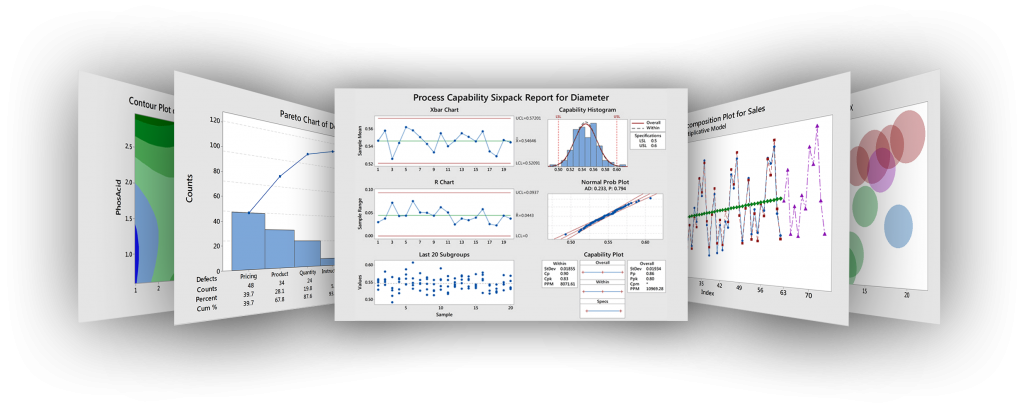
Graph Builder also got a genuinely useful addition: an interactive Variability Chart for visually identifying sources of variation and how factors relate to outcomes, plus the ability to customize decimal place display on axis values directly from the graph’s context menu. On the measurement systems side, Type 1 analysis now supports the VDA 5 standard used in automotive manufacturing, which matters if your quality work needs to align with that industry’s uncertainty-based measurement guidelines.
Key Features
- Response Optimizer for TreeNet, Random Forests, and MARS predictive models
- Interactive Optimization Plot for tuning predictor variables toward a target outcome
- Interactive Variability Chart in Graph Builder
- Customizable decimal place display for graph axis values
- Type 1 measurement system analysis with VDA 5 standard support
- Built-in Assistant to guide users through statistical analysis steps
- One-click data import and intuitive data prep tools
- Export graphs and output directly to Word and PowerPoint
- AI-generated summaries for select Graph Builder chart types
ScreenShots

System Requirements
- Windows 7, 8.1, 10, or 11
- Multi-core Intel, Xeon, or AMD-equivalent processor
- 4 GB RAM minimum, 8 GB or more recommended
- 4 GB free disk space recommended
- Active Minitab subscription managed through the Minitab License Portal
Why I Recommend
Response Optimizer is the addition that actually changes how a predictive model gets used day to day. Instead of building a model and manually testing different input combinations to chase a target outcome, the interactive plot does that search for you, which saves real analysis time on iterative process improvement work.
The VDA 5 support in Type 1 measurement analysis is a smaller but important detail for anyone in automotive manufacturing specifically. Aligning measurement system analysis with an industry-recognized standard matters more than it might seem when your results need to satisfy an external audit or supplier requirement.
For anyone doing statistical process control or quality analysis work, it’s worth browsing our Programming & Dev section for complementary data analysis tools that pair well with Minitab’s statistical toolset.
You May Also Like
Download Information
- Software Name: Minitab Statistical Software
- Version: 22.4.0 (2026 Build)
- File Size: 295 MB
- License Type: Full Version
Minitab 22.4.0 Full Version 2026
Download | Size: 295 MB | File Pass: Mazterize.net


sskakak
hi admin,
why is that i cant extract the file from crack.rar folder? can u help?
Hello …
I am trying to download the Minitab v17 application but receiving an error message after double-clicking on the following file C:\Users\…\AppData\Local\Temp\Temp3_Minitab17.zip\5e695eae24a5b\Extract File\Setup.zip\Setup.exe
Error: “Windows cannot complete the extraction. The destination file could not be created.”
Password is Given At The End With Complete Details How To Activate Software Follow Steps iF Problem Persists Let Me Know Thank All Links Workin If Get Error Try Other Browser Thanks Keep Visiting And Sharing.
Password is Given At The End With Complete Details How To Activate Software Follow Steps iF Problem Persists Let Me Know Thank All Links Workin If Get Error Try Other Browser Thanks Keep Visiting And Sharing.
Thank you 🙂
Wellcome keep visiting
Hi, i am trying install but Zip folder is not opening. i have entered password as ” http://www.materkreatif.com ”
showing wrong password.