

CyberLink YouCam Okay, so let’s be honest. Your built-in webcam? It’s probably… fine. It shows your face, maybe your messy background, and that’s about it. For a quick chat with grandma, sure. But for anything else – a serious work call, a gaming stream, or even just goofing around with friends – “fine” isn’t exactly cutting it anymore. You want a bit more pizzazz, some polish, or maybe just something that doesn’t make you look like you woke up five minutes ago, even if you did.
This is where CyberLink YouCam steps in, and frankly, it’s been a staple for ages. This isn’t just some basic webcam filter app you find on your phone. This is a full-blown utility designed to supercharge your webcam experience, making you look better, sound clearer, and just generally present yourself with a bit more flair. It plays nice with all your favorite video conferencing tools, streaming platforms, and even just for recording quick videos.
Why version 10.1.4728.0, specifically? Well, it irons out some of those annoying little bugs, gives you a bit more stability, and often brings some under-the-hood performance tweaks. You don’t want your fancy new background glitching out mid-presentation, right? A solid, updated version like this makes sure your digital persona stays consistent. It’s about taking your webcam from “just a camera” to “a pretty powerful presentation tool.”
Key Features of CyberLink YouCam
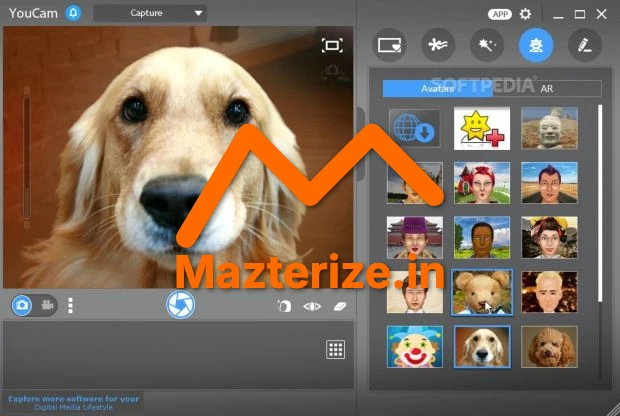
- Live Effects and AR Objects: Slap on wild masks, funny hats, or cool filters in real-time. It’s surprisingly good for breaking the ice or just having a laugh.
- Customizable Backgrounds: Instantly replace your cluttered room with a professional office, a scenic beach, or anything you want. No green screen needed, though a solid background helps.
- Skin Smoothening and Touch-ups: Look a little more awake, a little less tired. It’s like having a digital makeup artist working in the background. A lifesaver for early morning meetings.
- Webcam Recording and Surveillance: Easily record videos or set up your webcam for basic home security monitoring. It’s simple, but it works.
- Presentation Tools: Draw on your screen, use titles, or highlight key points directly in your video calls. Makes explaining things so much clearer.
- Login with Facial Recognition: A neat little security trick. Use your face to log into Windows or websites. Pretty slick.
Screenshot

System Requirements
- Operating System: Windows 11/10/8.1/8/7
- Processor: Intel Core i5 or AMD equivalent (Intel Core i7 or higher recommended)
- RAM: 4 GB (8 GB or more recommended for optimal performance)
- Storage: 500 MB free hard disk space
- Webcam: USB webcam or built-in webcam
- Graphics Card: 128 MB VGA VRAM or higher
FAQs
Q1. Is CyberLink YouCam easy to use?
Yes, it’s generally very intuitive. The interface is clean, and most features are just a click away.
Q2. Can I use it with Zoom, Teams, or Skype?
Absolutely. It integrates smoothly as a virtual webcam, so you can select it within most video conferencing apps.
Q3. Does it require a powerful computer?
Not overly powerful, but a modern processor and at least 8GB RAM will give you the best experience, especially with AR effects.
Q4. Are the AR effects actually any good?
They’re fun! Some are a bit silly, but others are genuinely impressive for spicing up a casual chat.
Q5. Can I use my own images for backgrounds?
Yep, you can upload any image you like to use as your virtual background.
Q6. Is it just for fun, or can it be used professionally?
It’s surprisingly versatile. The presentation tools and background replacement are great for professional settings, while the effects are perfect for casual use.
Other Software You May Like
Aiseesoft Total Media Converter Torrents
Joyoshare VidiKit 3.0.0.66 Crack Download
Atomix VirtualDj 2023 Pro Infinity Free download
Download Information
- Software Name: CyberLink YouCam v10.1.4728.0
- Setup Type: Offline Installer / Full Standalone Setup
- Compatibility: Windows
- Developer: CyberLink
- License: Full | Preactivated
- File Size: ~395 MB
- Download: Available via Multimedia category on Mazterize
Summary
Look, if your webcam game is feeling a bit… vanilla, CyberLink YouCam is a genuinely useful piece of software. It offers a surprising amount of polish and functionality, whether you’re trying to hide your messy room, look a bit more polished for a client call, or just want to put a funny hat on your head during a family video chat. This specific version, 10.1.4728.0, gives you a stable, feature-rich experience. Is it worth the download? For anyone who uses their webcam more than once a month, absolutely. It just makes things better.
CyberLink YouCam v10.1.4728.0 for Windows Download
Download | File Size: ~395 MB | Version: 10.1.4728.0 | File Pass: Mazterize.in


