
FoneLab for iOS 10.2.68 macOS Download

Dropping a phone in water or accidentally deleting a folder of photos is the kind of moment that makes you realize how little control you actually have over recovering that data once it’s gone. I covered AnyTrans for iOS for everyday content transfer between devices, but that’s a different job entirely from actually pulling deleted data back off a device or backup file.
FoneLab for iOS 10.2.68 is developed by Aiseesoft, and it’s dedicated iPhone data recovery software for Mac, built to recover deleted or lost data directly from an iOS device, or from an existing iTunes or iCloud backup. I also keep Tenorshare 4DDiG around for broader cross-platform recovery scenarios, but FoneLab’s focus is squarely on iOS devices and Apple’s own backup ecosystem specifically.
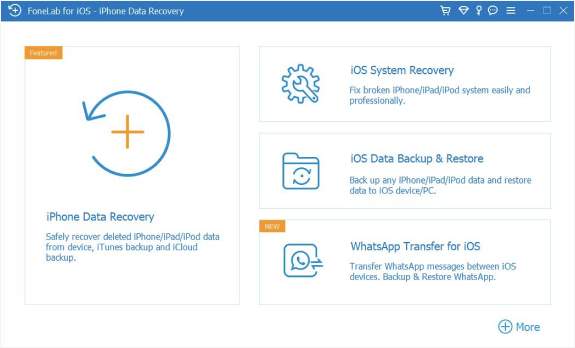
The software offers 3 distinct recovery modes depending on your situation. Recover from iOS Device scans and retrieves data directly from a connected iPhone, iPad, or iPod touch without needing an existing backup at all. Recover from iTunes Backup File pulls data from a previous local backup on your Mac. Recover from iCloud Backup File retrieves data from your iCloud account, useful when the device itself is lost, stolen, or too damaged to connect. Across all 3 modes, both deleted and still-existing files are shown side by side, letting you preview exactly what you’re about to recover before committing to it.
Data type coverage is broad: photos, contacts, messages, call history, calendar events, notes, reminders, Safari bookmarks, WhatsApp conversations and attachments, and more, retrieving up to 19 types of data depending on the source and device. The software is built specifically to recover data without overwriting anything currently on the device, a meaningful distinction from a full device restore, which risks wiping data you still need in the process of trying to recover what you lost.
Key Features
- 3 recovery modes: direct from device, from iTunes backup, or from iCloud backup
- Recovers up to 19 types of data, including photos, messages, and contacts
- Preview both deleted and existing files before recovery
- Recovers data without overwriting or restoring the current device
- Selective restoration from iCloud without downloading the full backup
- WhatsApp message and attachment recovery
- Handles recovery from water damage, accidental deletion, and factory resets
- Supports current and older iPhone, iPad, and iPod touch models
ScreenShots
System Requirements
- macOS 10.10 or later (current builds support macOS 26 as well)
- 1 GHz Intel or AMD processor or higher
- 1 GB RAM minimum
- 200 MB free disk space for installation
- USB cable for direct device connection, or Apple ID for iCloud backup recovery
Why I Recommend
The 3-mode approach is what makes this genuinely useful across different real-world scenarios. A lost or stolen phone needs iCloud recovery, a broken but backed-up device needs the iTunes backup mode, and an accidental deletion on a working device can often be recovered directly. Having all 3 paths in one tool means you’re not guessing which recovery method applies to your situation.
The non-destructive recovery approach matters more than people realize in the moment of panic after losing data. A standard device restore from backup can overwrite data that’s still present but at risk. Being able to recover selectively without touching the rest of the device protects data you didn’t even realize was still recoverable.
For anyone managing Apple devices, it’s worth browsing our Mac Software section for complementary tools that pair well with a dedicated recovery utility like this one.
You May Also Like
Technical Details
- Developer: Aiseesoft
- Version: 10.2.68
- Platform: macOS
- License: Full Version
Download Information
Download | Size: 75.87 MB | Pass: Mazterize.in


