
Eye Candy 7 Free Download With crack

About Eye Candy 7
Eye Candy 7 is a Photoshop plugin developed by Alien Skin Software, now known as Exposure Software. It’s designed for graphic designers, digital artists, and photo editors who want to add decorative effects to images and artwork. The plugin includes a collection of visual effects that can be applied to text, shapes, logos, photographs, and other graphic elements.
One of the main uses of Eye Candy 7 is creating realistic-looking surface effects. You can apply textures and dimensional treatments to lettering, logos, and illustrations without building every detail manually. This makes it useful for designing promotional graphics, website banners, posters, social media artwork, and other visual projects.
The plugin includes effects such as Chrome, Bevel, Glass, Shadow, Extrude, and several texture-based treatments. Each effect has its own settings, allowing you to adjust the appearance of an object according to the design. For example, Chrome can give lettering a metallic appearance, while Glass can create a transparent-looking surface effect.
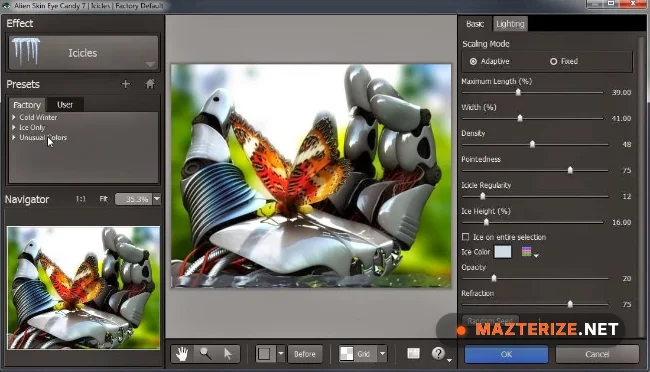
Eye Candy 7 also includes controls for adjusting lighting, surface depth, color, texture, and other visual properties. These settings help designers change the appearance of an effect before applying it to their artwork. You can experiment with different combinations to create custom treatments for titles, badges, icons, and decorative elements.
Another useful part of the plugin is its collection of ready-made presets. Presets provide starting points for different visual styles, saving time when working on repeated design tasks. You can select an effect, adjust its settings, and preview the result before applying it to the image.
For Photoshop users, Eye Candy 7 can be useful when creating graphics that need more dimensional detail. A designer working on a gaming logo, for example, can use metallic effects and shadows to give lettering a distinctive appearance. Similar effects can be applied to product graphics, title designs, illustrations, and digital compositions.
Compatibility depends on the version of Photoshop, Windows edition, and plugin installation method. Eye Candy 7 is an older product, so check the developer’s compatibility information before installing it on a modern computer. Back up your Photoshop settings and existing projects before making changes to an established editing setup.
Category
Key Features
- Chrome Effects: Create metallic-looking surfaces for text, logos, and graphic elements.
- Bevel Effects: Add depth and raised edges to lettering, shapes, and other design objects.
- Glass Effects: Apply transparent-looking treatments to selected graphic elements.
- Drop Shadows: Add shadows to separate objects from their backgrounds.
- Extrude Effects: Give selected artwork a dimensional appearance.
- Texture Effects: Apply decorative surface treatments to images and graphic elements.
- Custom Settings: Adjust available effect properties, including lighting, color, and surface appearance.
- Preset Collection: Start with prepared visual styles and customize them for individual projects.
- Photoshop Integration: Use the plugin within compatible Adobe Photoshop installations.
Screenshot

Installation Steps
- Check the official product documentation for Eye Candy 7 compatibility.
- Make sure your installed Photoshop version supports the plugin.
- Download the authorized installer from the developer or an authorized distributor.
- Close Photoshop before starting the installation.
- Run the installer and follow the displayed instructions.
- Complete the installation and open Adobe Photoshop.
- Locate Eye Candy 7 through the appropriate Photoshop plugin or filter menu.
- Open a test image and apply an effect to check that the plugin works correctly.
Note
Eye Candy 7 is commercial software. Use a valid license and obtain the installer through an authorized source. Avoid cracked installers and unknown activation files, as they can contain malware or unwanted modifications. Check compatibility carefully because the product is an older plugin.
You Can Also Download:
System Requirements (Windows)
- OS: Windows 11 (including v24H2) or Windows 10 (64-bit strictly required).
- Processor: Intel Core 2 Duo or AMD equivalent (modern multicore CPU recommended).
- Host Software: Adobe Photoshop CC 2015 to 2026, or Photoshop Elements 13 or later.
- Display: 1280×768 resolution or greater.
- Storage: 100 MB available space: Pro Tip: Install on an SSD to ensure that texture-heavy presets load instantly.
Summary
Eye Candy 7 is a Photoshop plugin for creating decorative effects such as Chrome, Bevel, Glass, Extrude, and Shadows. It can help designers create dimensional lettering, logos, promotional graphics, and digital artwork. Check Photoshop compatibility and licensing information before installing this older plugin.
Technical Details
- Software Name: Exposure Software Eye Candy Review
- Version: 7.2.3.189 (2026 Stable Build)
- Developer: Exposure Software
- License: Professional Review (Full License )
- Language: English
- OS: Windows (x64), macOS
Alien Skin Eye Candy 7 Review 2026
Download | Size:47 MB| Pass: Mazterize.net


