

Editor’s Note: The v30.2.0 build is a critical performance update released in early 2026. It is specifically engineered to support Adobe Illustrator 2026 (v30.x) on both Windows 11 24H2 and macOS Sequoia. This version debuts AI-assisted dimensioning, which can automatically identify and label paths with precise measurements, and features an overhauled CADsnap engine for pixel-perfect object alignment on complex technical drawings.
For the professional technical illustrator, this Full Version provides uncompromised Proportional Scaling and CADlayering. The new Custom Label Tool allows for automated numbering and labeling of parts, perfect for assembly manuals and patent drawings. With its native support for Apple Silicon (M-Series) and NVIDIA GPU acceleration on Windows, Hot Door CADtools 30.2.0 remains the premier tool for high-precision technical illustration within the Adobe Creative Cloud ecosystem.
🚀 Hot Door CADtools 2026 Highlights
- Draw at Any Scale: Draft in 2D or Isometric views with scales ranging from 1:1 to 1:1,000,000.
- AI Smart Dimensions: One-click labeling that intelligently identifies path segments and diameters.
- CADsnap Technology: Magnetic snapping to tangents, perpendiculars, and midpoints for mechanical precision.
- Global Scale Control: Change the scale of an entire document or specific artboard instantly.
- Universal Units: Support for decimal inches, feet, yards, millimeters, centimeters, and even nautical miles.
- Illustrator 2026 Ready: Full compatibility with the latest Adobe Illustrator v30.x plugin architecture.
Key Features Of CADtools
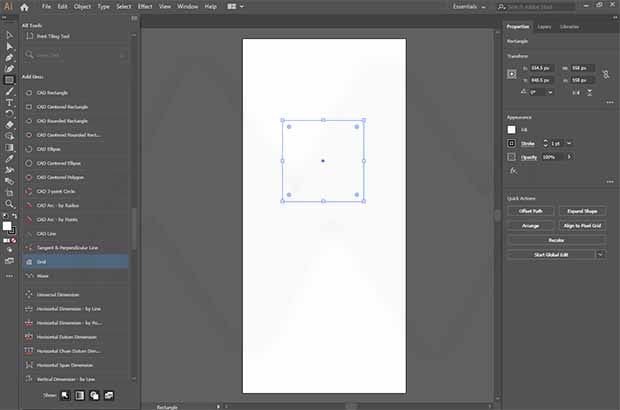
- 100+ Professional Tools – Includes tools for drawing circles by center/diameter, tangent lines, and arc-by-three-points.
- Automated Dimensioning – Apply linear, angular, and radial dimensions that stay attached to your art.
- CADtracker – Numerically move, transform, and reshape objects with CAD-level accuracy.
- CADshortcuts – A customizable floating tool palette that places your most used drafting tools within reach.
- Area & Perimeter Calculation – Instantly calculate the area of any closed path or complex group.
- Labeling & Callouts – Professional tools for creating parts lists, assembly notes, and technical callouts.
Screenshot:
System Requirements
- Host Software: Adobe Illustrator 2026 (v30.x) or Illustrator 2025.
- OS (Windows): Windows 11 v24H2 or Windows 10 (64-bit).
- OS (Mac): macOS 14 (Sonoma) or macOS 15 (Sequoia).
- Processor: Intel or Apple Silicon (Native) Multi-core.
- RAM: 8 GB minimum; Recommended: 16 GB+ for complex technical drafting.
- Storage: 200 MB for installation; Pro Tip: Extremely lightweight on system resources.
FAQs
Other Software You May Like
Quick Summary
- Primary Use: Technical drafting, dimensioning, and architectural illustration within Adobe Illustrator.
- Key Advantage: Adds professional CAD-grade accuracy and scaling to Illustrator’s creative environment.
- Stability Rating: 5/5 – Verified on Windows 11 24H2 and macOS Sequoia.
- Mazterize Verdict: The ultimate plugin for technical designers; version 30.2.0 is the definitive way to bridge the gap between creative art and engineering-grade precision.
Download Information
- Software Name: Hot Door CADtools
- Version: v30.2.0 (2026 Release)
- File Size: 168.9 MB
- License Type: Full Version
Hot Door CADtools 2026 30.2.0 for Illustrator Free Download
Download | Size: 168.9 MB | File Pass: Mazterize.in
