
EViews 13 Enterprise Edition Full Version 2026

Time series analysis and forecasting work outgrows spreadsheet software fast, the moment you need proper unit root tests, VAR models, or panel data structures, Excel just isn’t built for it. I use MATLAB for more general numerical computing and custom modeling, but for economics and finance-specific econometrics, it’s not as purpose-built as a dedicated tool.
EViews 13 Enterprise is that dedicated tool. It’s developed by IHS Markit (now part of S&P Global), and it’s the flagship edition of EViews, a statistical, forecasting, and modeling package built specifically around economic and financial data analysis. I also keep Minitab around for general statistical quality control work, but EViews is what I reach for the moment a project involves actual macroeconomic or financial time series.
What separates Enterprise from the Standard edition is data connectivity. Enterprise adds direct connections to third-party vendors like Haver Analytics DLX, FAME, Bloomberg, Datastream, Trading Economics, and Moody’s Economy.com, plus ODBC support for relational databases and access to EViews’ own Database Extension Interface (EDX) for building custom connections to proprietary data sources. If your work depends on pulling data from a specific institutional provider, that connectivity alone is often the deciding factor for choosing Enterprise over Standard.
Version 13 brought real interface and workflow upgrades too. There’s a new pane-and-tab interface option better suited to smaller displays than the traditional multi-window layout, programming language debugging tools, and Jupyter Notebook support, meaning Enterprise users can run and organize EViews programs directly inside a Jupyter environment. A new automatic dependency tracker also logs a program’s external dependencies, workfiles, databases, and other programs, which matters for reproducibility in academic or regulatory work.
Key Features Of EViews 13 Enterprise Edition
- Direct ODBC Access – Connect transparently to any ODBC-compliant database, including Oracle, SQL Server, and IBM DB2.
- Program Language Debugging – Identify and fix issues in your EViews programs using new breakpoints and step-by-step execution tools.
- Advanced Estimation – Support for Non-linear ARDL, Difference-in-Difference (DiD), and Bayesian Time-varying Coefficient VAR.
- Daily Seasonal Adjustment – New algorithms for handling high-frequency daily data with complex seasonal patterns.
- Transparency & Color Maps – Enhanced graphing tools with line/shade transparency and custom colormap presets for presentation-quality output.
- Program Dependency Tracking – Automatically log and track external workfiles, databases, and programs used in your workflow.
ScreenShots

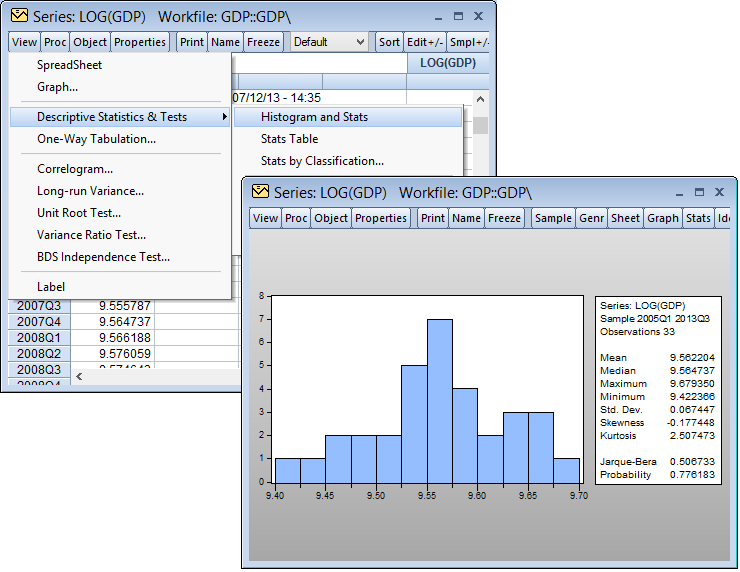
System Requirements
- Windows 10 or later (64-bit)
- 2 GHz processor or faster, multi-core recommended
- 4 GB RAM minimum, 8 GB recommended for large datasets
- 400 MB free disk space for the executable, documentation, and example files
- .NET 4.0 required for certain external database connections and the Excel add-in
Why I Recommend
The database connectivity is what justifies the Enterprise upgrade for anyone doing professional or institutional work. Manually exporting and reformatting data from Bloomberg or Datastream into a usable format eats up time that direct connectivity removes entirely.
The Jupyter Notebook support is a smaller addition, but a genuinely modern one. Being able to organize an EViews workflow inside a notebook environment, with results displayed alongside your code and notes, fits naturally into how a lot of research and reporting already gets done.
For anyone doing econometrics or time series forecasting, it’s worth browsing our Programming & Dev section for complementary statistical and data tools that pair well with a package like EViews.
You Can Also Download
Download Information
- Software Name: EViews Enterprise
- Version: 13.0.0 (2026 Release)
- File Size: 368 MB
- License Type: Full Version
EViews 13 Enterprise Edition for Windows Free Download
Download Link | Size: 368 MB Pass:Mazterize.net


You need to register your eviews. I can’t do it. What to do?
There is Complete Installation Process Check Post Again Thanks If Problem Persist Let Me Know!!
Portable EVIEWS 10 For Windows 32 Bit Or 64 Bit
Merupakan Software Portable, Tidak Perlu Install, Langsung Dipakai
Lebih Praktis, Bisa Disimpan Di Flaskdisk, Komputer, Laptop, DLL
Bisa Untuk OS Windows 32 Bit Dan OS Windows 64 Bit
hey mastercreatif, how about giving a shot at v.11?
Sure Soon….
bisa di download dimana ya ?
Password is Given At the end…
Portable EViews 11
Portable EViews 11 Is Portable Software No Need To Install.
Use It Directly.
Portable EViews 11 is a portable version of EViews 11.
Visit
https://s.id/EVIEWS_11
Hey, do you know how to update patch manually?
Process For Activation is given at the end thanks
i register e view softwar need serial and any username
thanks
Password rar apa gan?
you can download from link given below with password thanks
Download link is broken
password
Password is Given AT End
download link no longer works 🙁
password?
Password is Given At end