
Download Midnight Commander Let’s be real, managing files on Windows can sometimes feel like trying to herd cats in a vacuum. You’ve got Explorer doing its thing, which is fine for the basics, but what if you’re constantly jumping between directories? What if you need to copy a hundred files from one folder to another, or rename a bunch of things using some simple patterns? It gets clunky. It really does.
That’s where something like Midnight Commander comes into the picture. For anyone who’s ever spent time in a Linux terminal, MC is like an old friend, a text-based, dual-pane file manager that makes navigating and manipulating files ridiculously fast once you get the hang of it. And yes, it works on Windows now too.
It might look a bit old-school, a throwback to the days of DOS or early Unix systems, but don’t let the retro aesthetic fool you. This isn’t just for command-line junkies. This is about pure, unadulterated efficiency. We’re talking about managing your documents, your code, your media — whatever you’ve got — with just a few keystrokes, no endless clicking through menus. It’s a lifesaver for anyone who feels bogged down by the usual graphical interfaces.
Key Features of Download Midnight Commander
- Dual-Pane Goodness: Seriously, having two directory panes side-by-side just makes moving, copying, and comparing files incredibly intuitive. You see both sides of the operation at once.
- Keyboard-Driven Speed: Forget the mouse for a bit. Learn a few keybindings and you’ll fly through tasks. It’s surprisingly fast once it clicks.
- Integrated Viewer/Editor: Need to quickly peek into a text file or make a quick edit without opening a separate program? MC has it built right in. Handy.
- Built-in FTP/SFTP/SMB Client: Connect to remote servers or network shares directly from the file manager. This is super useful for devs and sysadmins, or just anyone pulling files from a NAS.
- Powerful File Search: Find files based on name, content, or modification date. It’s pretty robust for a text-mode tool.
- Shell Integration: Open a command line directly in the current directory. A real time-saver if you often switch between GUI and terminal.
Screenshot
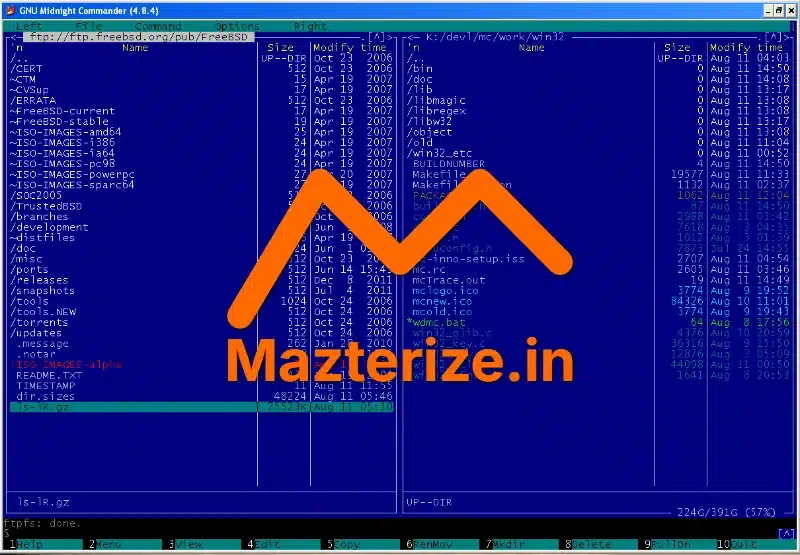
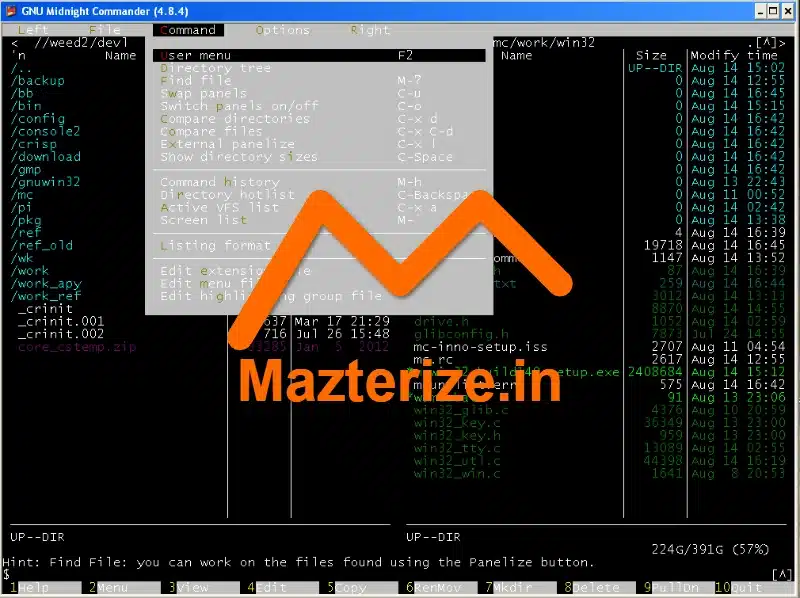
System Requirements
- OS: Windows 7 / 8 / 10 / 11 (32-bit or 64-bit)
- CPU: Any modern processor
- RAM: 128 MB or more
- Storage: 50 MB free disk space
FAQs
Q1. Is Midnight Commander difficult to learn?
It has a bit of a learning curve if you’re not used to keyboard shortcuts, but it’s very logical. Spend an hour with it, and you’ll pick up the basics fast.
Q2. Can I use a mouse with Midnight Commander on Windows?
Yes, absolutely. While it’s designed for keyboard use, you can click on files, menus, and buttons just like any other Windows application.
Q3. Is Midnight Commander free to use?
Yes, it’s open-source software distributed under the GNU General Public License. Completely free.
Q4. What kind of files can it open with its built-in viewer?
It’s primarily for text files, logs, and configuration files. It can also view binary files, though it won’t interpret them visually like a media player.
Q5. How do I install Midnight Commander on Windows?
You usually download a pre-compiled installer package or use a package manager like Chocolatey. It’s straightforward.
Q6. Is it better than Windows Explorer for daily use?
For power users who do a lot of file manipulation, absolutely. For simple drag-and-drop, Explorer might feel more familiar initially, but MC offers way more efficiency.
Other Software You May Like
Revo Uninstaller Pro v5.4.5 for Windows Free Download
Cheat Engine 7.6.2 Free Download (Latest 2025)
WindowManager 10.23.0 Free Download for Windows
Download Information
- Software Name: Midnight Commander for Windows
- Setup Type: Offline Installer / Full Standalone Setup
- Compatibility: Windows 32-bit / 64-bit
- Developer: GNU Project / various contributors
- License: Free | Open Source
- File Size: Approx 9.7 MB
- Download: Available via Utilities on Mazterize
Summary
Look, if you’re tired of clicking around Windows Explorer or just want a seriously efficient way to manage your files, Midnight Commander is worth a shot. It’s fast, powerful, and once you get comfortable with it, you’ll wonder how you lived without those dual panes and keyboard shortcuts. For anyone who spends serious time with file management, this is a solid download.
Download Midnight Commander for Windows
Download | File Size: 9.7 MB | Version: Latest Both 32bit,64bit | File Pass: Mazterize.in