

Stock Android camera apps hide almost every setting a real filmmaker would want control over: bitrate, codec, log profiles, manual exposure. CapCut 2025 handles editing after the fact, but it can’t fix footage that was shot in a phone’s auto mode with the wrong codec baked in from the start, which is exactly the gap mcpro24fps is built to close.
mcpro24fps manual video camera, current version 043d, is developed independently, and it’s a professional manual video camera app for Android built to pull the maximum recording performance out of whatever hardware your phone actually has. DaVinci Resolve Studio is where a lot of that footage ends up for color grading afterward, and mcpro24fps is specifically built to shoot footage that survives a serious color grading pass, log profiles, technical LUTs, and 10-bit recording included.
This v043d update added Laboratory Mode RAW video recording, new display LUT behavior options, and device-specific fixes for the Xiaomi 14/15 Ultra and Vivo X200 Ultra, alongside broader stability improvements. Recent version history also brought HOMG (Headroom Over Mid-Gray Control), deep UI optimization aimed at reducing device heating during long recording sessions, APV codec support, and new log curves and gamuts including DJI’s D-Log and Nikon’s N-Log.
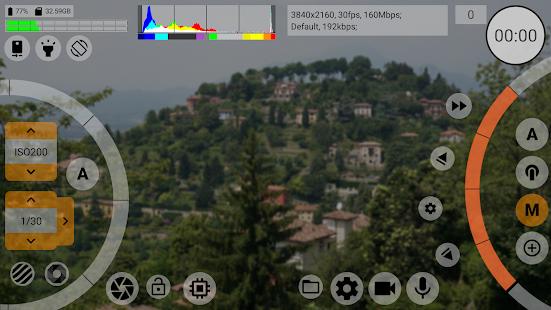
The core toolset covers what most stock camera apps simply don’t expose: recording at 24, 25, 30, or 60fps and beyond, resolution up to 8K depending on device, both AVC and HEVC codec support, bitrates up to 500 Mb/s, manual and automatic exposure modes, 3 focus modes, and both optical and digital stabilization. Focus Peaking and Expo Peaking give visual confirmation of sharp focus and exposure while shooting, and Zebra patterning helps avoid blown-out highlights in real time rather than discovering the problem after the fact in post.
Key Features
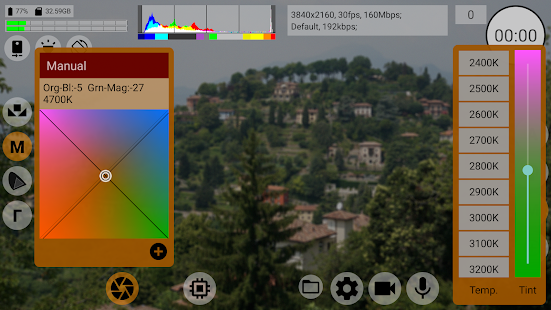
- Manual exposure, focus, and white balance (in Kelvins) controls
- Recording up to 8K resolution, device-dependent, with AVC and HEVC codec support
- Bitrates up to 500 Mb/s, variable and experimental constant bitrate modes
- Log profile shooting with technical and on-screen LUTs
- Focus Peaking, Expo Peaking, and Zebra for real-time exposure and focus control
- Laboratory Mode RAW video recording (added in this update)
- Multiple camera module support with individually saved settings per camera
- HLG/HDR10 HDR video recording
- Optical and digital video stabilization
ScreenShots
System Requirements
- Android with Camera2 API support (Limited level minimum, Full level recommended)
- 4 GB RAM minimum, more recommended for 4K/8K recording and RAW capture
- Storage space scales heavily with resolution and bitrate settings
- Feature availability varies by device, not every phone supports every feature
Why I Recommend
Focus Peaking and Zebra are the features that actually change how confidently you shoot. Catching a soft focus pull or a blown highlight in the moment, instead of discovering it during editing when nothing can be done about it, prevents wasted shoots in a way a stock camera app simply doesn’t offer.
Where this app is a genuinely bad fit is for casual users. The interface leans hard into professional terminology and manual controls, and the developer’s own community explicitly recommends reading the manual first. If you just want to point your phone and shoot something for Instagram, this is overkill and will likely frustrate more than help. It’s built for people who already understand exposure, log shooting, and codecs, not people trying to learn those concepts from scratch.
For anyone building a mobile filmmaking workflow, our Video Editing section has more tools worth pairing with a manual camera app like this once footage moves into post-production.
You May Also Like
Technical Details
- Developer: mcpro24fps (independent)
- Version: 043d
- Platform: Android
- License: Full Version
- First released: July 2019, in active ongoing development
Download Information
Download | Size: 6.47 MB | Pass: Mazterize.in
