

A broken physical back button, or a phone with gesture navigation that never quite feels natural, is a small annoyance that adds up over months of daily use. I keep Stickman Hook installed for downtime, but nothing kills a quick session faster than fighting your own phone’s navigation just to back out of a menu.
Back Button v2.06 is built to fix exactly that. It’s developed by ogapps, and it’s a lightweight accessibility utility that adds a floating, customizable back button anywhere on your screen. I also keep BeamNG Drive on the same device, and this app runs quietly in the background without any noticeable impact on performance while other apps are open.
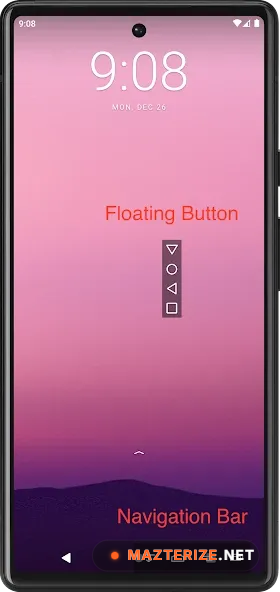
The core idea is simple: the floating button sits on top of whatever app you’re using and simulates the back function, even on devices where the physical or gesture-based back control has stopped working reliably. Beyond just Back, the app can also display Home, Recents, and Notification bar buttons, and starting from version 2.00, these buttons can be pinned directly to the navigation bar instead of floating loosely over the screen.
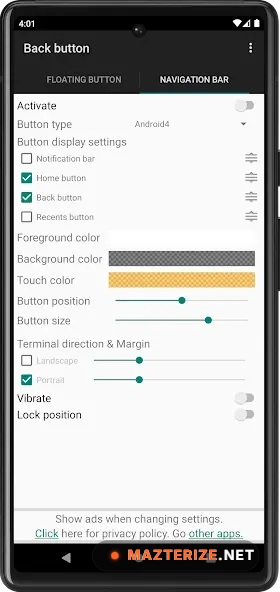
Customization is where the app spends most of its design effort for something this small. You can change button shapes, colors, and themes, drag the button to any position on screen, reorder which controls appear, and set up press-and-hold behavior for quick repositioning. It runs on Accessibility Services specifically to perform these navigation actions, and the developer states that access is used only for the button functions themselves.
Key Features
- Floating, draggable back button overlay for any screen position
- Optional Home, Recents, and Notification bar buttons
- Buttons can be pinned to the Navigation Bar (from version 2.00 onward)
- Multiple button shapes, colors, and themes for customization
- Reorderable button layout to match personal habits
- Press-and-hold to move buttons anywhere on screen
- No root required
- Small install size, under 4 MB
ScreenShots
System Requirements
- Android 5.0 or later
- 512 MB RAM minimum
- 10 MB free storage for installation
- Accessibility Services permission required for navigation functions
- “Display over other apps” permission required for the floating overlay
Why I Recommend
The no-root requirement is what makes this practical for most people. A lot of deep navigation customization tools on Android demand root access, which immediately rules them out for anyone not comfortable modifying their device at that level. This one works entirely through standard accessibility permissions.
The navigation bar pinning option added in version 2.00 is a small but meaningful upgrade too. A loose floating button can get in the way depending on what app you’re using, while pinning controls to the navigation bar keeps things feeling closer to native Android behavior.
If you’re dealing with a damaged navigation button or just prefer traditional on-screen controls over gestures, it’s worth browsing our Android Apps section for other accessibility and utility tools that solve similar small daily frustrations.
You May Also Like
Technical Details
- Developer: ogapps
- Version: 2.06
- Platform: Android
- License: Full
- Total downloads: over 14 million
Download Information
Download | Size: 3.47 MB | Pass: Mazterize.in
