
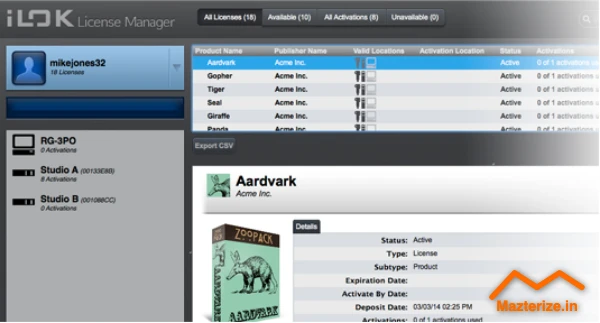
ilok License Manager Managing software licenses is often the most tedious part of a creative professional’s day. It shouldn’t be, but it is. iLok License Manager serves as the central hub for thousands of plugins and DAWs. It is the silent partner in your studio. Without it, your Pro Tools sessions or high-end boutique bundles simply won’t boot. PACE Anti-Piracy has spent years refining the interface to make it less of a hurdle and more of a utility.
This specific update addresses stability issues that previously plagued high-traffic studio environments. It is not just a utility; it is the backbone of your workstation’s security. We found that the latest build handles high-density license accounts much faster than previous iterations. If you have hundreds of licenses, you know the pain of waiting for a list to populate. That lag is largely gone here.
The software acts as a bridge between your digital assets and your physical hardware. It ensures your expensive tools remain accessible and secure at all times. Whether you use a physical USB dongle or the newer cloud-based activation, this manager is the only way to keep your workflow moving. It is a mandatory install for any serious production rig.
Key Features of iLok License Manager
- Cloud-based activation for internet-connected studios without physical hardware.
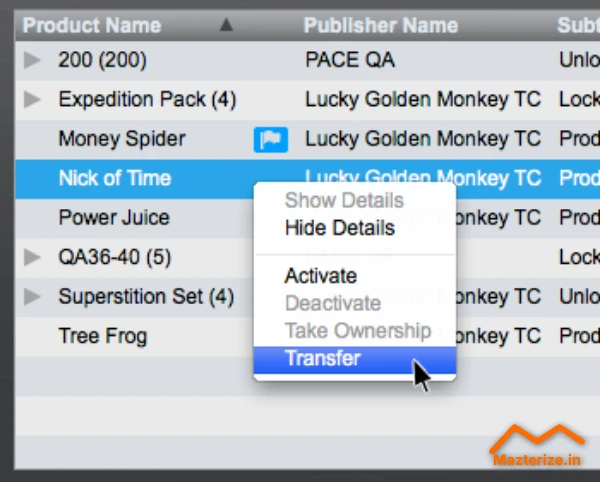
- Drag-and-drop license transfers between different physical keys or accounts.
- Zero Downtime protection integration to keep you working if a key breaks.
- Offline management tools for secure, air-gapped machines in professional facilities.
- Grouping functionality to organize massive plugin bundles into manageable folders.
- Network license support for multi-seat educational or commercial facilities.
Who Should Use
- Professional audio engineers using Pro Tools or high-end plugins.
- Video editors relying on Avid software or specialized visual effects tools.
- Studio managers who need to move licenses between different workstations quickly.
- Composers who travel between different studios and need portable license keys.
Who Should NOT Use
- Casual users who only use free or open-source software.
- Producers who exclusively use plugins that do not require PACE protection.
- Systems with extremely limited internet access that lack a physical iLok key.
Screenshot
System Requirements
- Windows 10 or Windows 11 (64-bit recommended).
- Intel or AMD dual-core processor or better.
- 4 GB of RAM.
- 200 MB of available hard disk space.
- Functional internet connection for initial activation.
FAQs
- Does this version require a physical USB iLok?
No, many modern licenses support iLok Cloud, which only requires an active internet connection.
- Can I move a license back to the cloud after putting it on a USB key?
Yes, as long as the software publisher allows it, you can drag and drop it back.
- What happens if my physical iLok breaks?
If you have Zero Downtime enabled, you can get temporary licenses immediately while your key is replaced.
- Does this software run in the background?
It runs a background service to verify licenses, but the manager app only needs to be open when you are moving licenses.
Other Software You May Like
MeldaProduction MCompleteBundle
Download Information
- Software Name: iLok License Manager 5.9.0
- Setup Type: Offline Installer / Full Standalone Setup
- Compatibility: Windows
- Developer: PACE Anti-Piracy
- File Size: 146MB
- Download: Available on Mazterize
Summary
Mazterize Team Review: After testing this build across several production rigs, the stability improvements are noticeable. It remains the industry standard for a reason. While license management is never a highlight of the creative process, this tool makes it as painless as possible for the working professional. The interface is utilitarian and gets the job done without unnecessary flair.
Last Updated: 2025
iLok License Manager 5.9.0 for Windows Download
Download | File Size: 146 MB | Version: 5.9.0 | File Pass: Mazterize.in