
Android Multi Tools Alright, look, we’ve all been there, haven’t we? You pick up your Android phone, maybe you’ve been a little too clever with your new pattern or PIN, or perhaps you just forgot it after a late night. Suddenly, your expensive paperweight is staring back at you, completely locked. Or even worse, you factory reset it and now it’s asking for a Google account you can’t for the life of you remember – that dreaded FRP lock. It’s a proper pain, truly.
Sometimes you’re messing around, flashing custom ROMs, or trying to root your device, and things just go sideways. You get stuck in a boot loop, maybe the phone isn’t recognized by your PC anymore, and you start sweating. Buying a new phone just because of a software glitch feels utterly wasteful, doesn’t it?
That’s where something like Android Multi Tools comes into play. It’s not some magic bullet for every single problem, but for a whole lot of those common, infuriating Android lock-ups and connectivity issues, this little utility can be an absolute lifesaver. We’re talking about getting back into your phone without a complete wipe, or at least getting it to a state where you *can* wipe it and start fresh.
Key Features of Android Multi Tools
- Unlocking forgotten patterns and PINs quickly.
- Bypassing that pesky Google FRP lock, which is a massive headache for second-hand phones.
- Flashing custom recovery images, like TWRP, if your phone supports it.
- Checking device information, which is surprisingly handy when you’re troubleshooting.
- Wiping data/factory resetting the device, even when you can’t access settings.
- Rebooting your device into fastboot or recovery mode from your PC, saving you finger gymnastics.
Screenshot
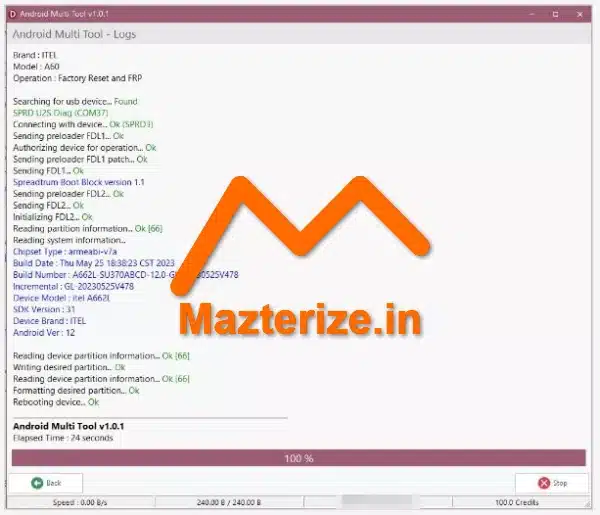
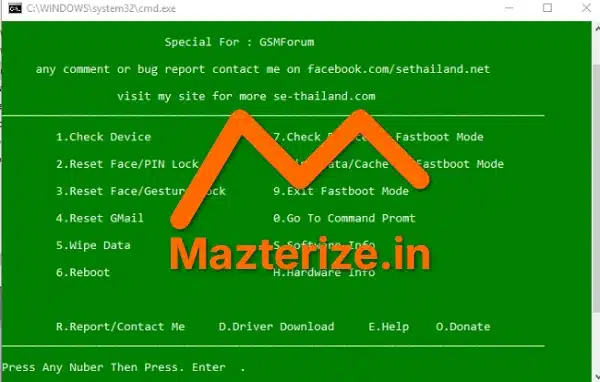
System Requirements
- Operating System: Windows XP/Vista/7/8/8.1/10 (32-bit or 64-bit)
- CPU: Intel Pentium 4 or later
- RAM: 512 MB of RAM required
- Storage: 50 MB of free space needed
FAQs
Q1. Is Android Multi Tools hard to use?
It’s pretty straightforward, honestly. Most functions are just a number input away.
Q2. Does it work on all Android phones?
No, it won’t work on absolutely every single model out there, but it covers a wide range of older and mid-range devices pretty well. Newer phones with tighter security might be trickier.
Q3. Is it safe to use?
Generally, yes, but you should always back up any critical data if you can. Resetting passwords or FRP can sometimes wipe your data.
Q4. Do I need root access on my phone for this tool?
Not for many of its functions, especially the unlocking or FRP bypass. You just need proper ADB drivers installed on your PC.
Q5. What if it doesn’t work for my specific issue?
Then you might need a more specialized tool for your device brand or a different flashing utility. No single tool fixes everything.
Other Software You May Like
Candy Crush 9999 Lives 200 Moves Download
Download Information
- Software Name: Android Multi Tools v1.02b
- Setup Type: Offline Installer / Full Standalone Setup
- Compatibility: Windows
- Developer: XDA Developers community
- License: Full | Preactivated
- File Size: ~10 MB
- Download: Available via Utility on Mazterize
Summary
Look, if you’re frequently tinkering with Android phones, or you’ve just run into one of those frustrating lock-out situations, Android Multi Tools is absolutely worth having in your toolkit. It’s lightweight, pretty intuitive, and solves a bunch of common problems without needing a computer science degree. Is it going to fix every single phone issue? No, of course not. But for the price of free, it’s an incredibly useful utility that can save you a ton of headaches. Absolutely grab it if you’re dealing with a stubborn Android.
Android Multi Tools v1.02b for Windows Download
Download | File Size: 10 MB | Version: 1.02b